A vessel page shows recent port calls and completed voyages — the movement history, not just the current point.
What you see
- "Recent port calls" — arrivals and departures with dates.
- "Completed voyages" — routes the vessel has already sailed.
How much history you can see
Without an account the page shows a preview: the two latest voyages and three port calls. With an account the depth opens as a window per plan:
- FREE — the last 7 days.
- PRO — the last 21 days.
- ENTERPRISE — the full archive.
The archive keeps accumulating, so its depth grows every day — the current number of days is shown right next to the history. Records beyond your window are not lost: they unlock when you move to a higher plan.
When the check counter is on for your account, the FREE 7-day window opens for 10 different vessels per 30 days; on further vessels you see the preview, as without an account, until a check frees up. See Free vessel checks.
How to open the full history
A visitor without an account sees a preview: the two latest voyages and the three latest port calls. Under the preview there are two buttons: "Sign up — free" and "Full history · PDF — $12.99". After signing up you land back on the same vessel, and the history opens to 7 days. The PDF can be bought without an account: enter your email, the document arrives there, and the purchase creates the account for you.
How much history each plan shows:
| Plan |
History window |
History snapshot (PDF) |
| No account |
preview: 2 voyages and 3 port calls |
$12.99 |
| FREE |
7 days |
$12.99 |
| PRO |
21 days |
$12.99 |
| ENTERPRISE |
the whole archive |
5 a month included, then $12.99 |
What sits under the table in your account:
- FREE sees two steps up — "PRO — 21 days of history" and "ENTERPRISE — the full archive". If a trial is available to you, a "Try PRO free for 7 days" button sits under them and starts the PRO trial. The "PRO" and "ENTERPRISE" buttons open the plans page, where you can also start the PRO trial.
- PRO sees the step "ENTERPRISE — the full archive".
- On both plans there is a "Download full history · PDF — $12.99" button below: a one-off purchase with every voyage and port call on file for that vessel. The document arrives at your account email. The snapshot captures the archive at the moment of purchase and is not updated afterwards. Pressing it again within 24 hours opens the snapshot you already bought — no second payment.
- ENTERPRISE sees the whole archive, and under the table a "Build the PDF — included in your plan" button with the remaining count: 5 snapshots a month per organisation. Plan snapshots are built by the organisation's account owner; a team member buys the file one-off. The document builds in seconds, you can download it right away, and a copy arrives by email. Once the 5 are used, the file is bought one-off until the 1st.
What the history snapshot (PDF) contains
The history snapshot is a PDF with every port call and completed voyage of the vessel on file at the moment it is built. The document opens with the "About this document" section:
| Line |
What it means |
| Observed since |
the day of the first record of this vessel in the archive. We hold nothing on the vessel before that date: if no calls appear before it, it does not mean there were none |
| Last position |
the time of the vessel's last position on file |
| Port calls on file, Completed voyages |
how many rows the tables below hold |
Then come two tables:
- Port calls — port, UN/LOCODE, arrival, departure and dwell in hours. Stays at the same port less than 6 hours apart are merged into one call.
- Voyages — from, to, departure, arrival and distance in nautical miles. Where no voyage is on file between two port calls, the document rebuilds the passage from the calls themselves: its distance is the straight-line distance between the ports, marked "≥".
If on some passage the vessel was silent for longer than the passage itself needs even at slow speed, the voyages table gets a "No data" column: how long there was no position from the vessel. The distance of such a voyage carries a "≥" sign — the track is not visible for that time, so the figure is a lower bound. During such periods the vessel may have called at ports not listed in the document.
Arrival and departure times are the port's local time, each with its offset from UTC, for example "2026-07-02 17:42 UTC+3", so they are easy to check against port-call paperwork. The vessel's last position time is in UTC.
Why it helps
- Understand the vessel's pattern and typical routes.
- See where it goes and how often.
For trading areas and the full picture, read the voyage blocks in full.
How to see which vessels called at a port
A port page shows the call history of every vessel — who called, when it arrived and departed, and how long it stayed alongside. It mirrors the vessel history: a vessel page answers "where has this ship been", a port page answers "who has been to this port".
- Open the port page — via search or the ports map.
- Sign in: the "Port call history" section is locked for visitors.
- Pick the depth with the 1 d, 21 d and whole archive buttons — each carries the label of the plan that opens it; pressing a locked button shows what the next plan gives. An exact period is set by dates: type the date as digits — 12102026 becomes 12.10.2026 — and press "Apply" or Enter. Dates follow the port's calendar: a period from 3 Oct to 3 Oct in Vladivostok is that local day.
- Narrow the list down: vessel-type chips, search by name, IMO or MMSI, sorting by date, time in port, deadweight or name. The deadweight and flag filters open on PRO.
Clicking a row opens the vessel panel — the same one as in the live sections above: deadweight, type, arrival and departure times, time in port, and on PRO the risk summary with owner and manager. The vessel cell shows the flag, name, IMO and MMSI; the vessel type comes from the registry and is shown in the page language, with the registry's exact wording in the tooltip.
Port analytics
The next section of the page is Port analytics (PRO): calls per day, median stay and stay by vessel type, type shares, flags, arrivals by weekday and by hour (in the port's local time), and the largest vessels of the period. Calls per day, median stay and the number of stays longer than three days count every call in the chosen period. Type shares, flags, arrivals by weekday and hour and the largest vessels use the calls loaded in the table: when the period holds more than 1,000 calls, the block states how many of the latest calls it used out of the total. On the free plan the block is visible but blurred.
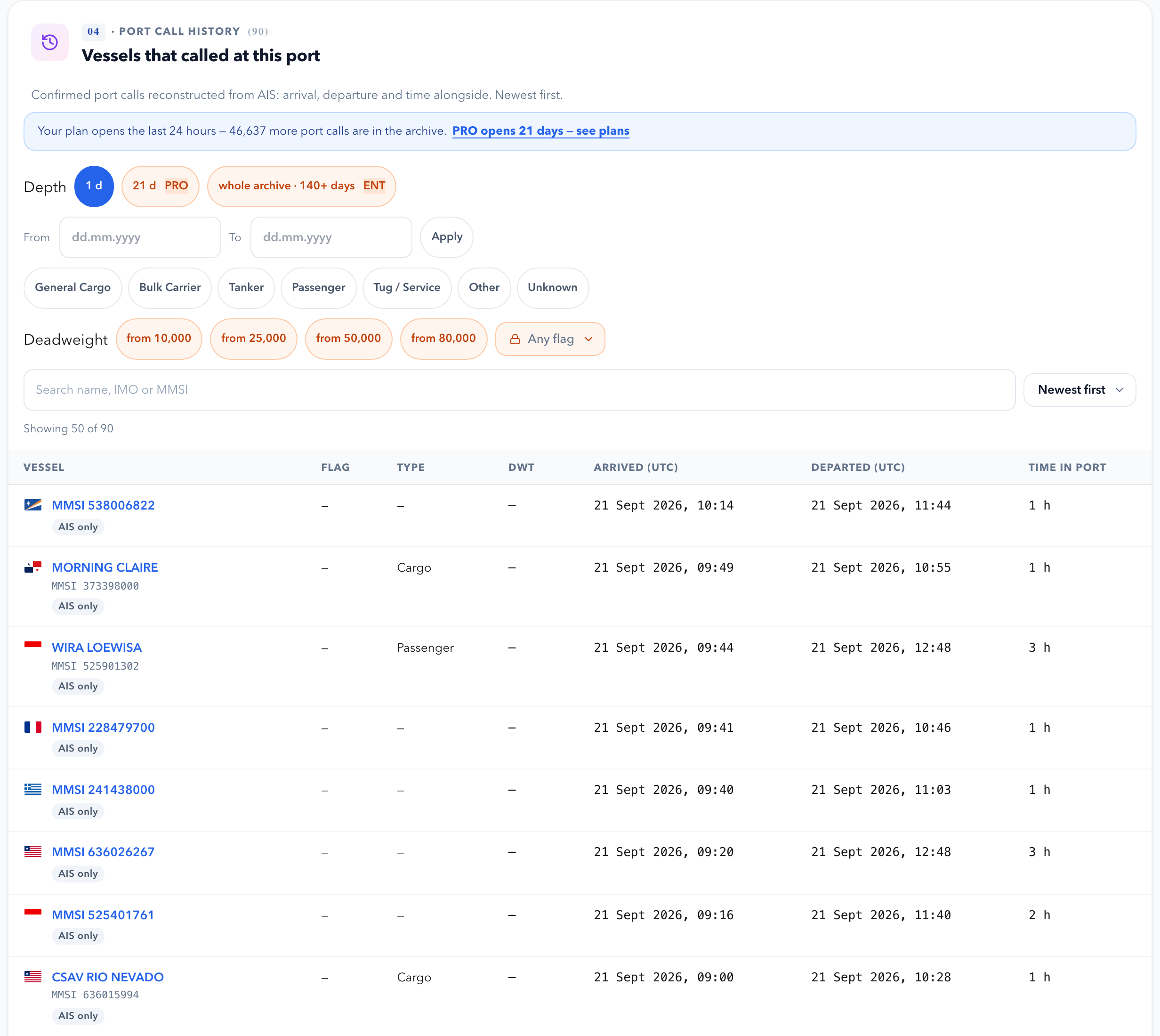
The history depth on a port page: FREE — the last 24 hours, PRO — 21 days, ENTERPRISE — the full archive. Only confirmed calls with at least 1 hour alongside count: transiting past a port or waiting at anchor is not a call. One view returns up to 1,000 calls — narrow the dates for longer periods.
See also