A company page shows who stands behind a vessel — the registered owner, ship manager or ISM manager — and what fleet they run. Open it by clicking a company name in the "Ownership" block on any vessel page.
The address is rynda.io/companies/<country>/<company-name>.
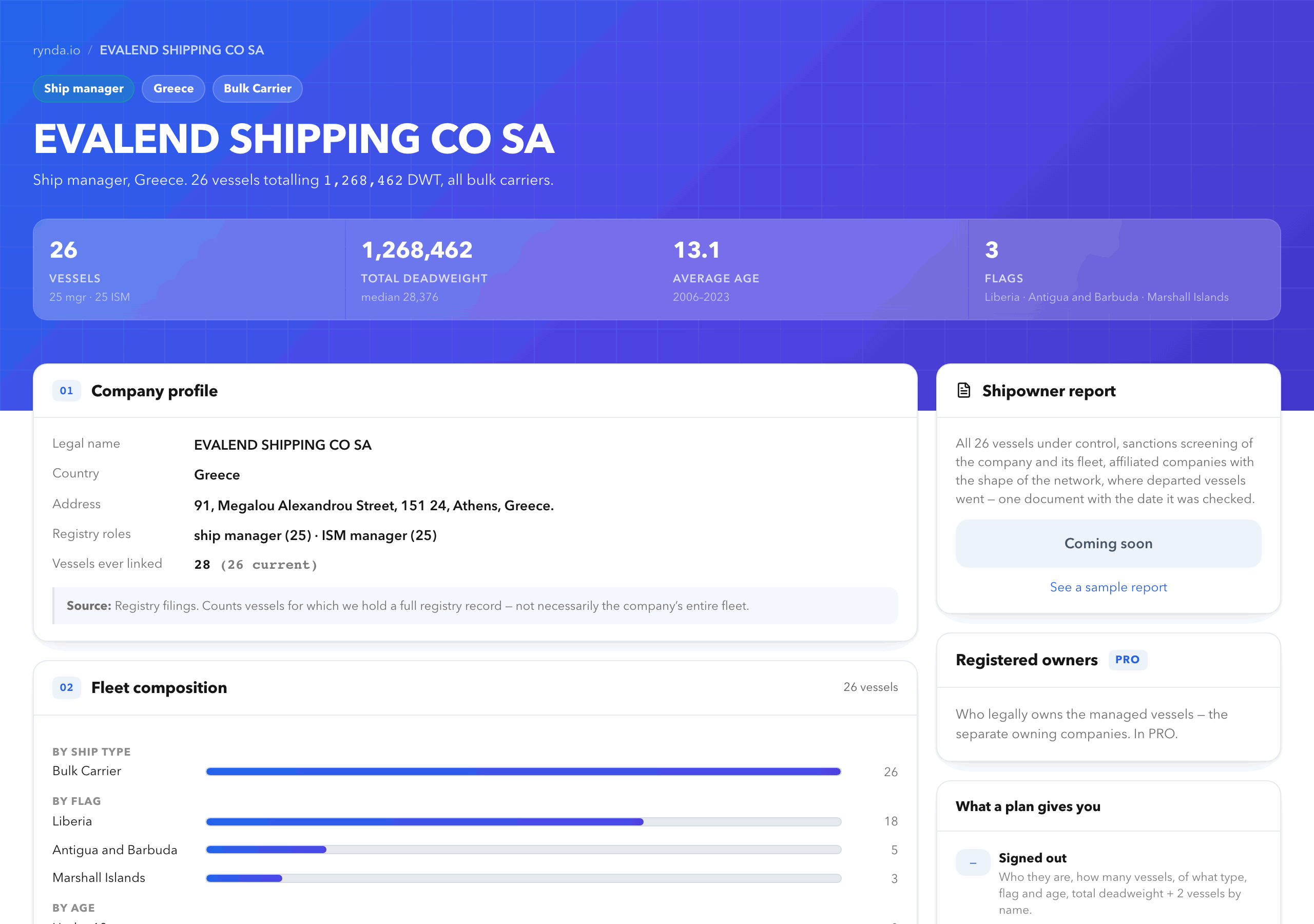
Visible without an account
- Legal details: full name, country, registered address.
- Registry roles: registered owner, ship manager, ISM manager, DOC holder — and how many vessels the company holds each role on.
- Fleet composition: vessel count, total and median deadweight, breakdown by ship type, flag state and age.
- Two vessels by name — the newest and the largest, each linking to its own page. The rest of the fleet is listed by type and deadweight only.
The fleet counts vessels for which we hold a full registry record. It is not a guarantee that the company runs nothing else — the page shows the date the data was reconciled. The company's sanctions status is not published on the public part of the page — the sanctions and PSC summary unlocks after signing in.
Unlocked by a free account
- The full vessel list with name, IMO, flag, year built and deadweight.
- Last AIS position for each vessel and whether it is at sea or in port.
- Sanctions and PSC summary across the fleet: how many vessels appear on sanctions lists, how many inspections and detentions the fleet has had.
- Departed vessels — which vessels the company ran before, in what role and over what period. One row per vessel: a hull held in two roles at once is not listed twice.
Included in PRO
- Where the fleet trades — a map of port-call concentration and the routes the fleet repeats. It shows which regions the company actually works and which port pairs are standing ones.
- Affiliated companies — entities linked to this one through shared management of the same hulls. This is the normal shape of shipping: the vessels one manager runs are each owned by a separate single-vessel company.
- Per-vessel sanctions and PSC detail.
The affiliation section opens with a verdict on the shape of the network: a holding of single-vessel companies, a network of working operators, or a mix. Those are different answers for a counterparty check, and a list of identical rows hides the difference.
Every link between companies comes from registry filings on a specific vessel. A matching name or a shared address is not treated as affiliation and is not shown.
Included in ENTERPRISE
- Who runs the departed vessels now — extra columns in the same departed-vessels table rather than a section of its own: who holds the hull today and in which country. A fleet moving to a different jurisdiction is the signal this section exists for; a vessel changing hands on its own is not.
- One shipowner report a month, at no charge, for the account owner.
The shipowner report (PDF)
The shipowner report is a PDF carrying a check date that puts the whole page into one file for a deal folder. It is a one-off purchase; no subscription is required.
What it contains:
- Company profile — legal name, country, address, registry roles, vessels ever linked.
- Fleet under control — every vessel with IMO, type, deadweight, year built, flag, the company's role and the date it took it.
- Compliance and sanctions — whether the company itself is listed, how many fleet vessels and how many affiliated companies appear on sanctions lists, inspections and detentions over 36 months.
- Vessels on sanctions lists — which vessel is on which lists, and since when the record is in our data.
- Affiliated companies — with their own fleets, the sanctions status of each, and the verdict on the shape of the network.
- Departed vessels and where they went — one table: when the hull was taken on, when it was let go, and who runs it now.
- Fleet dynamics — vessels taken on and let go per year, with a verdict: growing, shrinking or steady.
- Inspections and detentions by vessel — how many inspections each hull has had, how many detentions, and when it was last checked.
- Detentions: where and when — date, port and authority for each detention.
- Where the fleet trades — the ports with the most calls and the routes it repeats. The observation period is stated in the section itself.
The report profile carries the company registration number (company IMO) so the findings can be verified against the registry. That number is not published on the page itself.
The report is always built in full, whatever plan the buyer is on: the payment is for the document, not for a view of the page.
It arrives at the email address you give and stays in your account under orders. No prior sign-up is needed — the purchase creates the account.
PRO does not include the report. ENTERPRISE includes one report a month, and only the account owner can take it at no charge; a team member buys it.
The report costs $99 and is bought on the company page with Build the report — $99, paid by card.
You can open a sample report before buying — the link sits under the button. The company and vessels in it are fictional; the structure is the same as in a real report.
Common questions
Why does this company have only one vessel?
That is normal. In shipping each vessel is usually held by its own owning company, while one manager runs the fleet. Look for the manager's page — the whole fleet is there.
Why can I only see two vessels out of twenty?
The full list is open to registered users. Signing up is free and takes under a minute.
How is the report different from what the page already shows?
By its check date and by completeness. The page is live and keeps changing; the document fixes the moment the data was reconciled, which is what matters in a dispute. It also carries the sections from every access level at once.
The data differs from the company's own website.
We publish what the registries publish, with the date it was reconciled. Registries lag behind a change of owner or manager.
See also