
Mail for Storm AI: forwarding emails and connecting a mailbox
Updated November 27, 20266 min read
On this page
"Mail for Storm AI" is a block on the My agents screen through which Storm AI reads your work email: tonnage lists, cargo offers and deal correspondence. For each email it writes a short line and what is needed from you, pulls out cargoes and vessels and checks them against your fleet. Storm AI does not send emails to anyone.
Where to find mail for Storm AI
Open the My agents screen: in the Storm AI chat, use the My agents button on the left panel; in your account, use the account menu in the top right corner. The Mail for Storm AI block is on that screen.
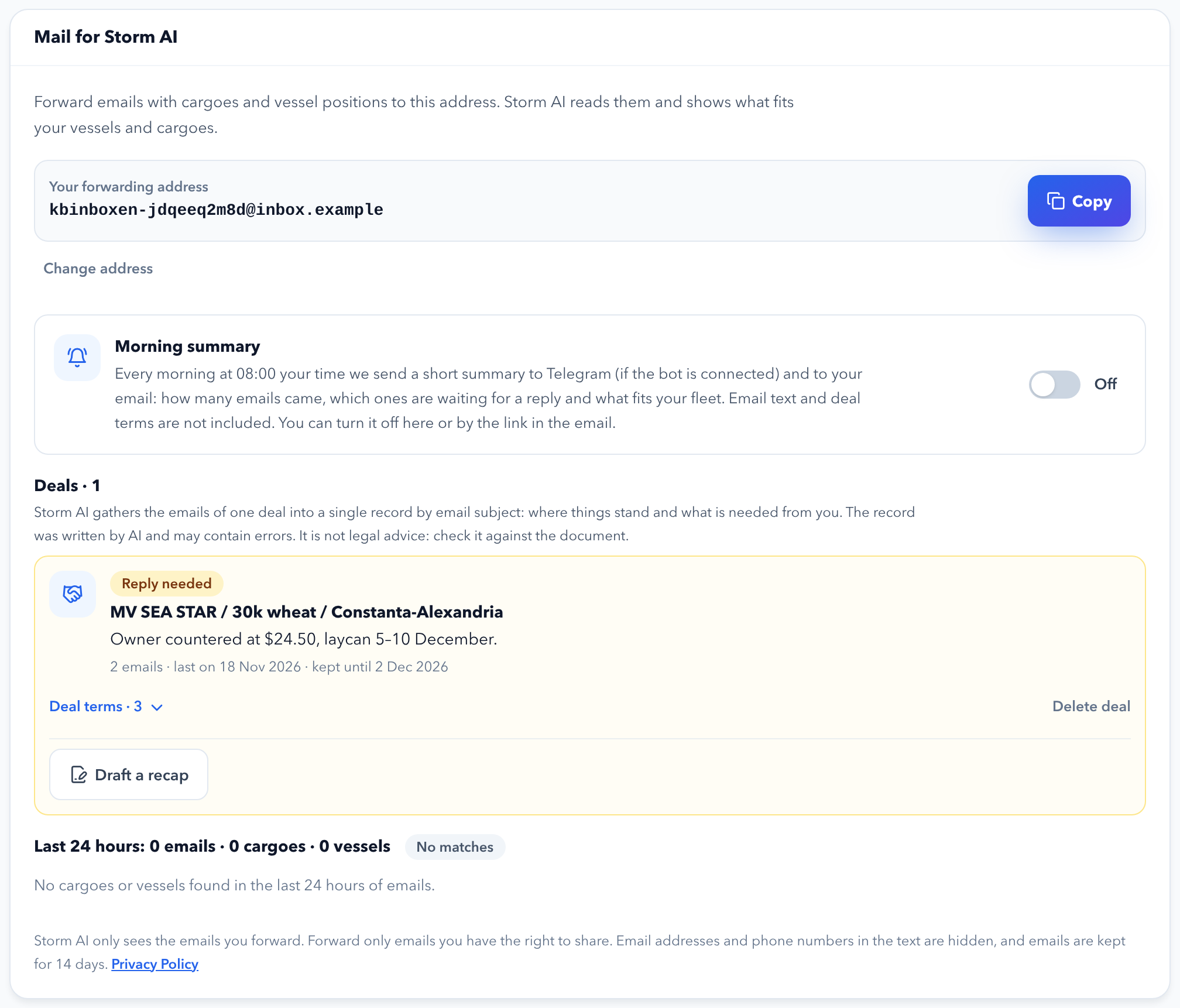
Emails reach Storm AI in two ways. You can use both at once.
| Way | How it works | Best for |
|---|---|---|
| Forwarding | you forward emails to a personal address, and Storm AI sees only those | a few emails, or when you want to pick them by hand |
| Connected mailbox | Storm AI reads one folder of your mail itself | broker circulars that arrive every day |
How to forward an email to Storm AI
- In the Mail for Storm AI block, find Your forwarding address and press Copy.
- Forward a broker's email with a cargo or a tonnage list to this address. You can also set up automatic forwarding of circulars in your mail.
- The breakdown appears in the same block in a couple of minutes.
Change address gives you a new address. The old one stops accepting emails at once, and the emails already received and their breakdown are deleted. If you set up automatic forwarding, update it.
How to connect a mailbox
Storm AI connects to your mailbox over IMAP with an app password: a separate password your mail provider issues for outside apps. You do not enter your main mail password.
- Press Connect a mailbox.
- In Mailbox and app password, choose your mail provider: Yandex, Mail.ru, Gmail or Other (IMAP). For Other, also enter the IMAP server.
- Enter the email address and the app password. The link under the field opens your provider's guide to creating an app password.
- Press Check and choose a folder.
- In Choose a folder, pick one folder. It is best to keep a separate folder for circulars so personal emails do not get into it.
- Confirm that you have the right to connect this mailbox and press Connect.
Once connected, the block shows the mailbox address, the folder and the time of the last check. The first check runs in a couple of minutes.
For Gmail, an app password works only if 2-Step Verification is turned on in your Google account. In Google Workspace mail, your administrator may not allow app passwords.
What Storm AI does with a connected mailbox
- it reads only the chosen folder, and only emails that arrive after you connect;
- it does not send, delete, mark as read or open attachments;
- it hides email addresses, phone numbers, account and document numbers in the text.
If your mail stops letting Storm AI in, for example because the app password was revoked, the block shows a message. Press Disconnect and connect the mailbox again with a new app password.
What you see after the breakdown
The block collects the emails of the last 24 hours:
- The day's summary: how many emails, cargoes and vessels came in and how many offers fit your fleet.
- Emails in brief: one line per email with what it is (offer, deal, other), what it is about and what is needed from you: Reply needed, Signature needed, Payment needed or To review. The terms from the email are listed under the line.
- Cargoes and vessels: cards with the cargo, quantity, ports and loading dates, or with the vessel, deadweight, open port and open date. Under each card are the line of the email it came from and the vessels of your fleet that fit.
Remove from list deletes our copy of the email text and its breakdown. The email stays in your mailbox.
How deals from email work
Storm AI gathers the emails of one deal into a single record by email subject. In Deals, each record shows where things stand, what is needed from you, the deal terms, the number of emails and the date of the last one.
Draft a recap prepares the recap text from the deal terms; it takes up to a minute. Storm AI does not send the draft to anyone: add contacts and bank details yourself. Copy the draft puts the text on your clipboard.
Delete deal deletes our record of the deal and its terms. The emails in your mailbox stay.
Summaries, deals and drafts are written by AI and may contain errors. They are not legal advice: check them against the document.
Morning summary by email and Telegram
The Morning summary switch turns on a short message every morning at 08:00 your time: how many emails came, which ones are waiting for a reply and what fits your fleet. Email text and deal terms are not included. The summary goes to Telegram if the alerts bot is connected, and to your email. You can turn it off in the same block or by the link in the email.
How long emails and deals are kept
| What | How long it is kept |
|---|---|
| Emails, their breakdown and short lines | 14 days |
| Deal records and recap drafts | 180 days after the last email of the deal |
Everything is deleted earlier if you remove the email or the deal, change the forwarding address, disconnect the mailbox or delete your account. When you disconnect a mailbox, the app password and all emails parsed from it are deleted at once. See the Privacy Policy for details.
Each account accepts up to 300 emails a day.